Fill more tables, even when nobody picks up.
Google, Instagram, WhatsApp, your website, the phone: all your channels land in one book, in real time. Your guests book at 1 am or in the middle of the rush, without waiting for someone to pick up.
112,274 covers booked online on EatNow in September 2026, without a single call.
 Google
 Instagram
 WhatsApp
 TripAdvisor
- 19:30LefèvreGoogle · booked at 1:12 am4p
- 20:00BennaniInstagram · booked at 9:47 pm2p
- 20:00MoreauWebsite · booked at 2:05 pmDeposit6p
- 20:30SansoneWhatsApp · booked at 11:38 pm3p
- 21:00El IdrissiPhone · entered at 6:20 pm2p
One online booking in two arrives when nobody can pick up.
At night, or mid-service. That's the table a phone alone lets slip, and the one the book takes anyway.
EatNow data. Bookings created from 1 October 2025 to 30 September 2026 (September 2026 for covers and channels), excluding cancellations and demo accounts. 147 venues in September 2026, mostly in Morocco.
How many covers arrive without anyone picking up?
Enter your activity. The maths applies the averages measured on EatNow: the share of covers booked online, and the share that lands at night or mid-service.
- 909
- of which at night or mid-service, when nobody can pick up
- 3,467
- covers booked per month in total
Estimate based on EatNow averages over the twelve months to 30 September 2026, walk-ins excluded: 51.5% of covers booked online, of which 50.9% at night or mid-service. This is not a promise of gain: your numbers depend on your channels and your guests.
Guests book where they find you, the booking lands in your book.
Each channel gets its own booking link. The booking keeps its origin: you see which channel fills your room, and none of them costs you a commission per cover.
41 → 52% median share of bookings made online, between a venue's first two months on EatNow and its sixth (95 venues).
A booking module in your venue's colours. Guests pick their covers, date and time without leaving your page.
GoogleOfficial partnerGuests book from your listing, in Google Search or on Maps.
Instagram and TikTokYour booking link in the bio. Bookings made through it arrive tagged with their network.
WhatsAppThe AI agent answers the guest and books inside the conversation, including when the restaurant is closed.
See the AI agent →TripAdvisorYour booking link on your listing. The traveller who discovers you books in one click.
The team enters the call or the walk-in in the same book, with the name of the person who recorded it.
Requests scattered everywhere, or one book kept current.
The phone at the front desk, Instagram messages on the manager's mobile, the notebook on the counter: each channel lives on its own, and requests that arrive at the wrong moment get lost.
Tables lost along the way
- The phone rings mid-rush and nobody picks up
- An Instagram message waits for a reply until the next day
- The notebook says one thing, the screen says another
- A table sold twice on a Friday night
Every request lands in the same place
- Guests book on their own, at any hour, from whatever channel they have at hand
- The booking enters the book in real time, with its channel
- Once a slot reaches capacity, EatNow stops offering it
- The team looks at the same book before service
“Avant, on jonglait entre le téléphone, Instagram et le cahier. Maintenant tout arrive au même endroit et l'équipe voit la salle en direct. On passe beaucoup moins de temps sur la logistique et beaucoup plus en salle.”A table frees up during service, the book follows.
- When a cancellation is recorded, the slot can be offered online again according to your availability rules.
- When the service is full, the waitlist takes over: the freed table is offered to the guests who signed up.
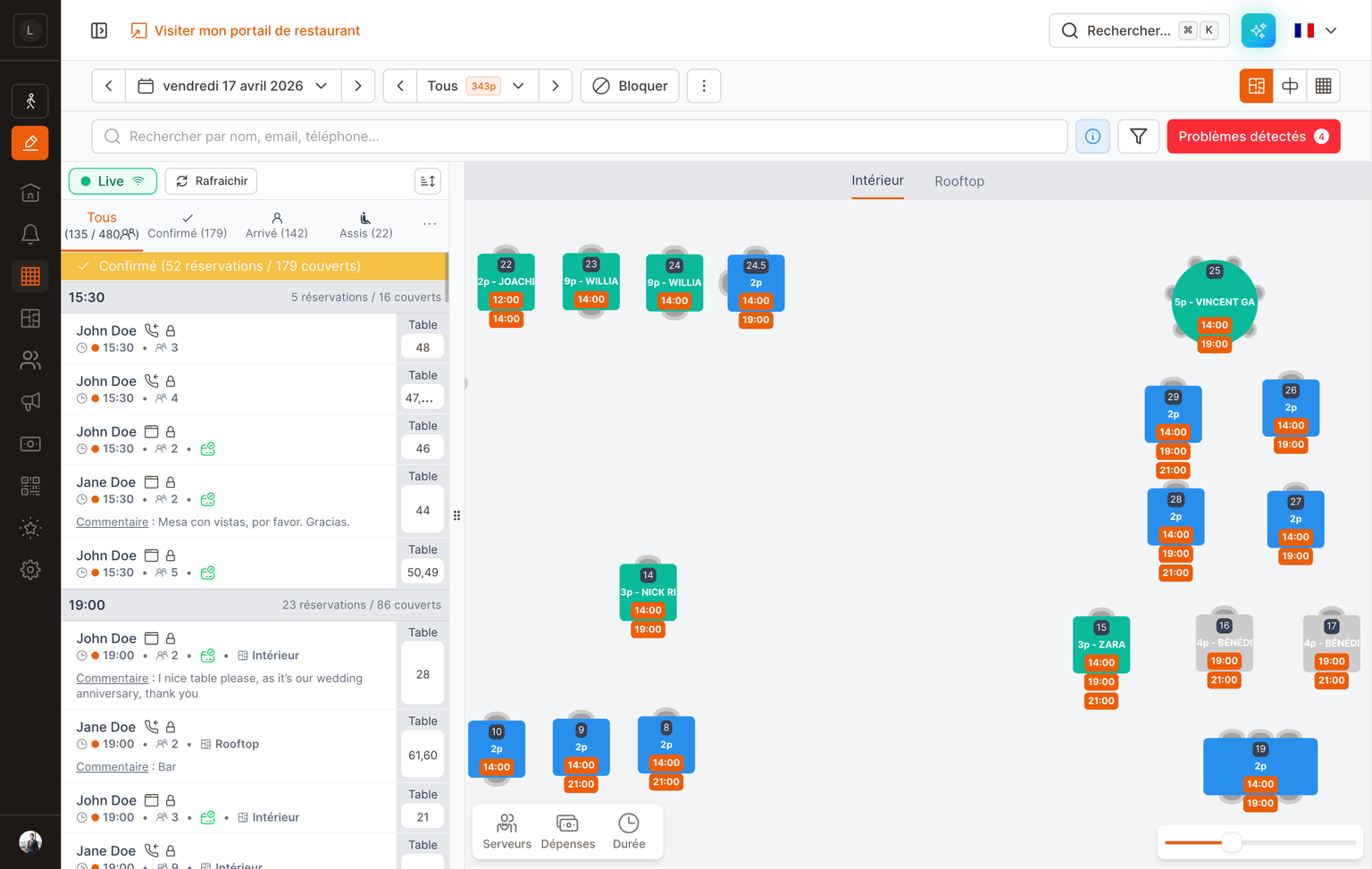
- The floor plan and the book are synced. When a table assignment changes, the whole team sees it.
Every recorded change, with its origin.
Every booking keeps a record of what happened to it. Not just what the team did: the system and your providers write to the same log.
- 6:57 pmSalma · front deskBooking created for 4 covers at 8:30 pm
- 7:04 pmStripe€40 deposit captured
- 7:05 pmSystemConfirmation sent once the deposit cleared
- 8:11 pmYassine · floorCovers changed 4 → 6, table 12 → table 14
- 10:48 pmPOSBill settled and attached to the booking
- 11:02 pmSystemBooking closed after payment
Who changed what
The log shows who changed the covers, the table or the deposit, and at what time.
Your providers too
When they're connected to EatNow, payments and the till also leave a trace in the same log.
Useful when you're not there
The next day, you find the actions that were recorded on the booking.
About the reservation software
Do you pay a commission on your covers?
No. EatNow takes no commission per booking or per cover, whatever channel the guest books through. Online payments (card guarantee, deposit, prepayment) follow the terms of your plan.
Which channels can you connect to the book?
Your website, your Google listing (EatNow is an official Reserve with Google partner), Instagram, TikTok, Facebook, TripAdvisor and WhatsApp. Phone bookings and walk-ins are entered by the team in the same book.
How do you know which channel fills your room?
Every booking keeps its channel of origin. The links you publish are tagged per channel, and the booking lands in the book with that information.
Does a booking taken by phone appear too?
Yes, provided it is entered in EatNow. It then appears in the book like any other, with the name of the person who recorded it.
What happens when a slot is full?
EatNow stops offering it online. If the waitlist is on, the guest can join it, and a table freed by a cancellation is offered to them.
Who can see a booking's history?
You decide. The history follows the rights you give each team member: some see the service book, others the full history of a booking.
Bring your whole room onto EatNow.
Reservations, deposits, WhatsApp confirmations, CRM, reporting — one single system. Human support, in French and English, from people who've worked service.